

.jpg)
Inquiries, complaints, or quote requests cannot wait – each one is an opportunity to build a stronger relationship or a risk of losing trust. In a world where efficiency is a step on the road to success, you need a tool that will help you exceed customer expectations.
Thulium is a ticket system that not only organizes inquiries but also speeds up their handling, enabling your team to focus on what matters most—delivering value. It is an excellent solution for everyone who cares about the efficient handling of email and other communication channels, especially if you run or are considering opening a Contact Center department in your company.
What is a ticket system and how does it work?
A ticket system is a tool used to manage customer inquiries (so-called tickets). It collects messages from clients in one place. It can do this from all communication channels—hotline, email, chats, Messenger, WhatsApp, Instagram. Every inquiry is treated as a separate case, which receives a unique number and is routed to the system, where it is monitored, classified, and assigned to appropriate employees. This allows you to track every stage of problem resolution, ensuring full process control.
In Thulium, every ticket is also a fully-fledged task that is handled until it is closed.

.jpg)
The 4-step ticket management process in Thulium
The ticket management process in the Thulium system is intuitive and allows for full control over every inquiry. The main steps in the process are:
1. Creating and registering inquiries
A customer can report a problem through various communication channels, such as email, a form on the website, Allegro Discussions, or a popular messenger. Every inquiry is immediately registered in the system. An inquiry can also be created by a consultant, e.g., after a telephone conversation with a client.
2. Assigning and managing tickets
The basic element of ticket handling in Thulium is assigning the inquiry to the appropriate person or team responsible for its resolution. Assigning tickets to specific employees or work groups allows for quickly directing the case to specialists who have the appropriate knowledge and experience.
The system also allows assigning priority levels to tickets, which helps quickly identify the most urgent matters and resolve them first. This allows teams to focus on the most important tasks and not waste time on less critical matters.
3. Effective work on a ticket
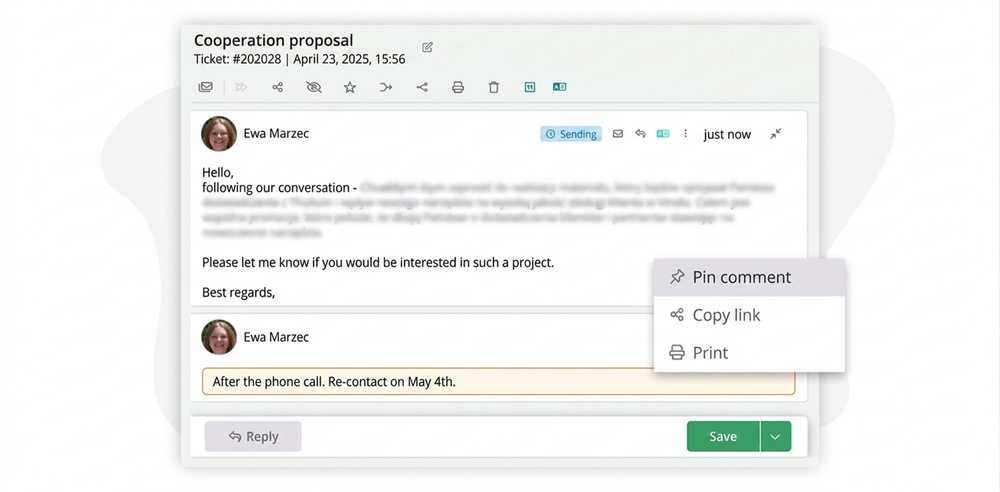
The support team proceeds to solve the problem. During this process, it is possible to exchange messages with the user, document actions taken, and update the ticket status. In Thulium, you can add comments to inquiries that are not visible to the user but only to colleagues or the employee themselves. This allows the support team to exchange remarks, share important information, and leave notes reminding them of important steps to be taken later in the ticket resolution process. Such comments are also useful when the team is working on more complicated inquiries that require the cooperation of many people. This enables maintaining order and fluidity in the problem-solving process and ensures that no important information is overlooked.

4. Closing the ticket, i.s., resolving the inquiry
After the problem is resolved, the ticket is closed, and the user receives a notification about the completion of the process. At this stage, the client can evaluate the handling of their case, which allows for gathering valuable feedback on the quality of service. Such evaluations help in further perfecting the support process and ensure that the team responds to all user needs and expectations.
Closing the inquiry does not have to mean a consultant is completely cut off from the matter. The follow-up setting comes to the rescue—a reminder of the need to contact the client in the future. An example may be a situation where there is an agreement with the client that they will be contacted again on a specific date. In such a case, the ticket can be closed but with a follow-up set, which allows it to be reopened at the designated time. This solution is also useful when a consultant wants to postpone a given ticket until later but intends to return to the case on a certain day. Thanks to the follow-up function, the ticket status will change from "closed" to "open" and will reappear on the list of active inquiries. This ensures that no case is forgotten and that the user service process remains fluid and effective.
Integration of the Thulium Inquiries module with other communication channels
Thulium enables the creation of tickets directly from other systems, such as CRM or e-commerce platforms. This integration gives the customer service team immediate access to the full customer history, which significantly speeds up the problem-solving process.
Thanks to integration with Allegro, messages from Allegro Discussions are automatically assigned to tickets, which facilitates resolving disputes and answering questions. Integration with Messenger and WhatsApp allows consultants to respond to messages without logging into external platforms, centralizing all communication in Thulium. Customer service can efficiently manage all communication channels, which definitely increases work efficiency.

.jpg)
Automation in inquiry handling
Automations in Thulium allow for streamlining inquiry management, eliminating the need for manual changes and status monitoring. They make it possible to automatically assign inquiries to appropriate queues, change priorities, or send notifications to users and clients. Automation rules operate on the principle of "condition → action," meaning the system takes specific actions depending on the inquiry status, time since the last response, or inquiry category. This solution increases the efficiency of the support team and allows for faster reaction to urgent matters.
Analysis and reporting of inquiries – how to effectively monitor customer service?
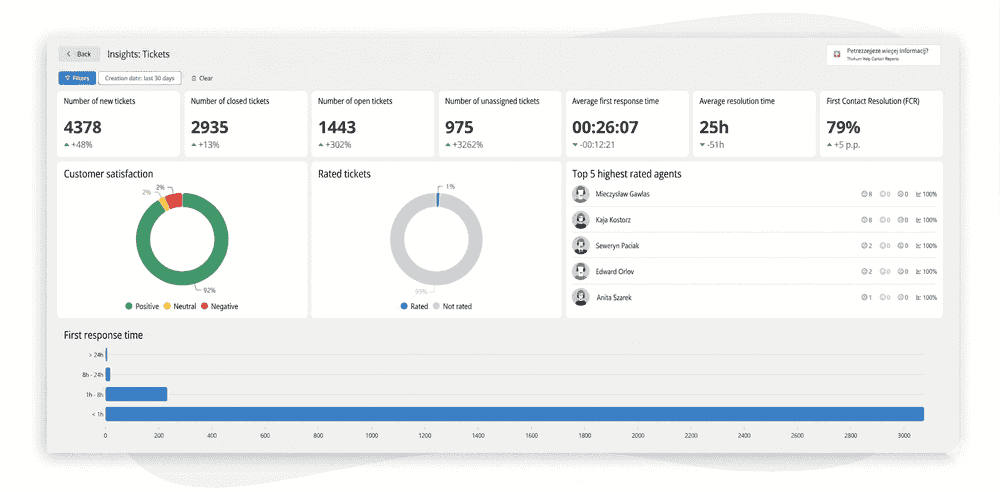
Thulium offers extensive reports that allow for a detailed analysis of inquiries and monitoring of customer service effectiveness. Thanks to reports, you can check, among other things, the number of inquiries, closing time, first response time, and agent effectiveness. The system also enables the assessment of service quality by customers, which helps in optimizing processes and increasing the level of satisfaction. By analyzing the data available in the reports, managers can quickly identify areas needing improvement and make decisions based on real performance indicators.
Who is the ticket system for?
A ticket system is an excellent fit for every company, regardless of industry or size, that has a customer service department or contact center where client-company contact occurs through many communication channels. A ticket system is particularly useful for order fulfillment, reporting problems or irregularities, and handling complaints and returns.
Ticket system for SMEs – how to choose the best solution?
For small and medium-sized enterprises (SMEs), it is important to find a system that not only improves inquiry handling but is also tailored to their needs and budget. Thulium offers a solution ideal not only for large companies but also for SMEs—flexible, intuitive, and scalable.
When choosing a ticket system for SMEs, it is worth paying attention to:
- Integrations with other tools – CRM, e-commerce, messengers,
- Process automation – automatic rules streamlining team work,
- Ease of implementation and use – an intuitive interface means a quick transition to effective work,
- Flexibility and scalability – the system should grow with the company so as not to limit its capabilities,
- Technical support and documentation – availability of help for users in the form of support and a knowledge base.
Ticket system in practice – industry applications
Regardless of the industry you operate in, the ticket system will perfectly adapt to its specifics. Thulium strives to meet the requirements of customer service and provides companies with flexible, comprehensive products that will significantly facilitate the execution of daily duties for you and your employees.
Thulium offers solutions dedicated to various industries and tailored to their specifics. Below are a few examples of how the ticket system supports work in selected industries.
E-commerce and sales
The ticket system is an excellent solution for the e-commerce industry and sales process handling. In e-commerce, time and information matter. Customers ask: "Where is my package?" or "How do I make a return?" Thulium, thanks to integration with Apilo, BaseLinker, and platforms such as Magento, PrestaShop, or Shoper, displays the customer's order card directly next to their email or during a phone conversation. The consultant does not have to jump between windows to check the shipment status. Additionally, full integration with Allegro allows managing discussions and questions about an item from a single panel, which drastically shortens the reaction time and protects your sales quality rating.
Furthermore, the client can choose their preferred contact path. Questions requiring only a short, substantive answer can be successfully handled, for example, using chat or an embedded messenger in social media. Easy access to all necessary information will help meet the speaker's expectations, which will positively affect their experience with your company and encourage them to make future purchases.
Catering
Catering companies manage a large number of orders, and customer service must operate at the highest level. In the boxed diet industry, the morning peak is crucial—customers call and write early in the morning when the diet has not arrived or they have changed the intercom code. The ticket system allows assigning the highest priority to these inquiries and automatically directing them to on-duty personnel. This ensures that simple changes to orders are processed instantly, before the driver sets off, and complaints are handled on an ongoing basis, which reduces the subscription cancellation rate. Thanks to tickets, the company gains better organization and transparency in orders and related inquiries, regardless of the communication channel through which they were executed.
Tourism
Travel agencies and hotels face clients who contact them through multiple channels—they ask for trip details via email, clarify by phone, and send confirmation via Messenger. Thulium merges all these interactions into a single customer history thread. Thanks to this, when a client calls with a problem at the airport, any consultant immediately sees the entire history of arrangements, reservations, and previous correspondence. This facilitates service during peak season and in crisis situations.1
Thanks to the ticket system in the tourism industry, staying in constant contact with clients and companies providing other services, such as transport companies, will be extremely simple and organized. This will help avoid organizational chaos and positively affect the company's image among customers
Medycyna
Telephone registration is the heart of a clinic, which is often overloaded. The Thulium ticket system supports medical facilities by combining telephone and email inquiries. A key feature here is managing missed calls—Callback. The system automatically creates an inquiry (ticket) for every missed call, so reception can call the patient back at their leisure. This eliminates the problem of lost appointments and builds patient trust, as they feel cared for.1
The ticket system is also a good way to relieve the workload of registration employees, for example, in clinics or specialist offices. By handling multiple communication channels and the ability to integrate with external platforms, it allows for effective organization of all information necessary for the proper functioning of the facility.
IT Services, B2B, and Service Desk
For companies handling technical inquiries, adhering to SLA (Service Level Agreement) deadlines is crucial. Thulium allows monitoring the response time and resolution time of an inquiry, alerting managers when the deadline is threatened. This enables IT companies to professionally handle failures, prioritize critical inquiries, and report the quality of provided service to clients.
Summary
A ticket system is an excellent solution for all companies that value good organization of inquiry handling and professional customer support. It allows adapting the mode of operation to the constantly growing expectations of clients and adjusting to the ever-changing world using modern, intelligent tools. Choosing a ticket system is a good decision regardless of your industry's specifics. If you want to learn more details, arrange a call with our consultant who will present Thulium's capabilities. This is a great way to see how a ticket system can support your business.
FAQ – Frequently Asked Questions about Ticketing Systems
A ticketing system is a specialized software designed to manage customer service inquiries. It centralizes messages from various communication channels—such as email, phone, live chat, and social media—into a single dashboard. Each inquiry is converted into a unique ticket with its own ID number, allowing teams to track, categorize, and assign tasks to the right employees efficiently.
The system eliminates manual work through automation rules. For example, it can automatically route technical issues to the IT department or prioritize urgent messages based on keywords. Features like internal comments (visible only to staff) and clear ticket statuses (e.g., "Open," "Pending," "Resolved") ensure smooth collaboration and prevent duplicate responses to the same customer.
For online stores, integration with platforms like Allegro, Shopify, or Magento is a game-changer. When a customer reaches out, the agent immediately sees the order history, payment status, and shipping details right next to the conversation. This reduces "tab-switching," speeds up response times, and allows for much more personalized support.
Yes. Advanced tools like Thulium offer comprehensive reporting and analytics modules. Managers can monitor key performance indicators (KPIs) such as:
- SLA (Service Level Agreement): First response time and full resolution time.
- Ticket volume: Total number of inquiries handled per agent.
- Customer Satisfaction (CSAT): Scores provided by customers after their issue is resolved.
This data is crucial for identifying bottlenecks and optimizing the support process.
A follow-up feature allows agents to set reminders for future actions on a specific case. Even if a ticket is closed, the system can automatically reopen it at a scheduled time to check if the customer is still satisfied or to re-engage a lead. It ensures that no customer is forgotten and helps build long-term professional relationships without relying on manual notes.

Klaudia Kranc
B2B Marketing Specialist



%2010pxcorner.png)

.jpg)